
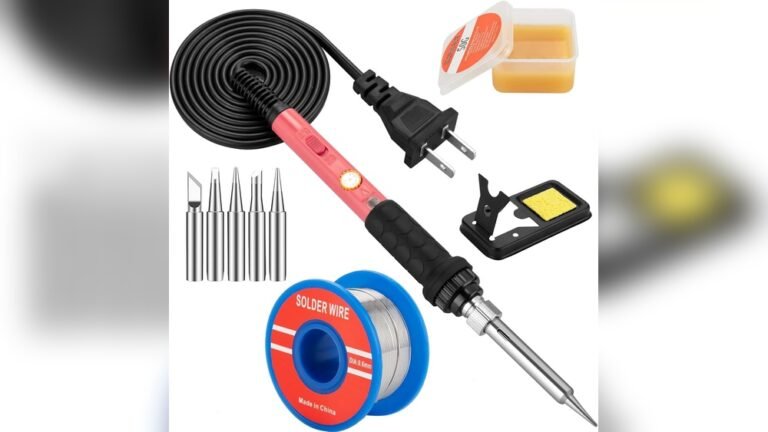
It’s easy to feel unsure when tackling a DIY project or fixing electronics at home. You might have grabbed an old soldering iron and ended up frustrated with slow heating or poor results.
Choosing a 60 Watt Soldering Iron Kit sounds simple, but there’s more to it than price or wattage. Kits vary in what they include, how comfortable they feel, and how quickly they heat up. Some are basic, others have extras you might not need.
The differences aren’t always clear until you start using them.
This guide will help you understand what to look for, and which type of kit fits your needs.
What Actually Matters For Soldering Iron Kits
- Comfort matters—especially if you work for more than a few minutes.
- Temperature control is helpful for different tasks, but not always required.
- Extra tips and accessories are nice, but only if you’ll use them.
- Quick heating saves time, but some kits trade speed for durability.
Common Mistakes Buyers Make
- Choosing only by price and ignoring build quality.
- Overlooking the importance of a reliable on/off switch.
- Buying kits with more accessories than needed.
- Assuming all 60W irons perform the same.
The products below were chosen to cover a range of needs, from basic repairs to more frequent use. Each kit offers something different, so you can match your choice to how you actually work.
Q-ming Adjustable 60w Soldering Kit
The 60 Watt Soldering Iron Kit is ideal for hobbyists and repair work, offering adjustable temperature and fast heating for reliable electronic fixes.

This kit gives you everything needed to start soldering electronics and small repairs. Adjustable temperature control lets you work on delicate or tougher jobs, while the quick heating ceramic core saves waiting time. The included tips and accessories help you handle a range of soldering tasks without needing extra tools.
Using this soldering iron feels straightforward and safe. The ON/OFF switch makes it easy to control and the ventilation holes help keep the handle cool during longer sessions. Beginners and experienced users alike can set up fast and work confidently, knowing the kit covers basic needs without fuss.
What Sets It Apart For Diy And Repairs
- Adjustable temperature for different materials
- Heats up in about 15 seconds
- Includes multiple interchangeable tips
- Portable and easy to carry
- ON/OFF switch for energy saving and safety
- Comes with essential accessories (stand, sponge, solder wire, flux paste)
- Good for a wide range of applications
Things To Consider Before Buying
- May not suit heavy-duty industrial soldering
- No advanced station features (like digital display)
- Simple stand may not feel as stable as larger holders
Where This Shines
This kit is best for people who need a compact, reliable soldering setup for electronics, repairs, or DIY projects. It eliminates the hassle of gathering separate tools and speeds up setup, so you can focus on your work without delays.
The adjustable temperature and quick heating remove guesswork and stress, especially for beginners. For better results, let the iron reach your chosen temperature fully before starting. The ON/OFF switch and efficient heat dissipation offer peace of mind, keeping your workspace safer and more comfortable.
I find the included tips especially handy for switching between tasks.
| Best for | Why |
|---|---|
| Electronics repair at home | Quick heating and adjustable temperature fit circuit boards and delicate parts |
| DIY hobby projects | Includes multiple tips and accessories for varied soldering needs |
| Jewelry and small metal work | Fine tip options and easy control make precision tasks simpler |
| Beginner soldering practice | Simple setup and safety features help new users learn confidently |
Q-ming 60w Soldering Iron Kit
The 60 Watt Soldering Iron Kit is a portable solution designed for quick electronic repairs and DIY projects.

This kit is a practical tool for anyone needing to solder small electronics or make quick repairs. It heats up fast using ceramic technology and comes with five extra tips, so you can handle a range of tasks without hunting for extra parts.
You won’t need a bulky soldering station, making it easy to use anywhere.
In daily use, the iron warms up in seconds, and the on-off switch means you can work safely and efficiently. Its lightweight design and included stand help keep your workspace tidy. Changing tips is straightforward, and the fast cool-down feature means less waiting.
It’s a kit that makes basic soldering approachable, even for beginners.
What Stands Out
- Heats up and cools down quickly for less waiting
- Includes five varied tips for different tasks
- Plug-and-play design—no need for a soldering station
- Comes with a stand, sponge, and solder wire for convenience
- Suitable for electronics, jewelry, and appliance repairs
- Easy on-off switch for added safety
Consider Before Buying
- Not ideal for heavy-duty or industrial soldering
- Basic stand may feel flimsy to experienced users
- Limited to 110V power outlets
Who This Fits Best
This kit is best for beginners, hobbyists, or anyone who wants a simple soldering solution for electronics, jewelry, or quick home repairs. It removes the need for a dedicated soldering station, which can save both space and setup time, and takes the guesswork out of choosing the right tip for small jobs.
For best results, let the iron fully heat before starting and use the included sponge to keep the tip clean—this keeps your work neat and the tool lasting longer. You’ll appreciate the on-off switch for peace of mind, knowing you can power down instantly when needed.
If you’re new to soldering, this kit gives you the basics without surprises or stress.
| Best for | Why |
|---|---|
| Electronics hobbyists | Multiple tips and fast heat-up for circuit board repairs |
| DIY home repairs | Portable, no need for a dedicated workspace |
| Beginner soldering projects | Simple controls and included accessories make it easy to start |
| Jewelry or small metal work | Fine tips support delicate soldering tasks |
Meakest Adjustable Soldering Iron Kit
This 60 Watt Soldering Iron Kit is ideal for anyone seeking precise temperature control and versatility for electronics repair tasks.

This kit provides a simple solution for soldering small electronics, hardware, and repair projects. The adjustable temperature lets you fine-tune the heat, so you avoid damaging delicate components. The inclusion of multiple tip shapes means you can handle everything from guitar wiring to computer repairs without extra purchases.
Using the MEAKEST Adjustable Soldering Iron Kit feels straightforward and comfortable, thanks to its ergonomic handle and silicone cover. The on/off switch adds safety, letting you pause work easily without unplugging. The range of tips means you’re always ready for a new task, which saves time and reduces hassle in everyday repairs.
What Makes It Stand Out
- Adjustable temperature for different repair needs
- Includes five tip shapes for flexible use
- Ergonomic handle reduces hand fatigue
- On/off switch for quick, safe power control
- Protective silicone cover for safer handling
- 24-hour support and service guarantee
Keep In Mind
- Not designed for heavy-duty or industrial soldering
- Requires access to 110V power outlet
- Does not include a carry case or extra solder wire
When I’d Pick This
This soldering kit is best for hobbyists, DIYers, or anyone handling small electronics repairs at home or on the go. It removes the stress of managing temperature and tip changes, letting you focus on the repair instead of the tool.
If you’re new to soldering, start on a lower temperature setting and test on spare wire to get comfortable.
The safety features and ergonomic design help you avoid accidents and fatigue, giving you more confidence during longer sessions. For someone who values convenience and reliable performance, this kit means fewer surprises and a smoother repair experience. I appreciate how the quick tip changes make tackling different projects less of a chore.
| Best for | Why |
|---|---|
| Small electronics repairs | Precise temperature control prevents damage to sensitive parts |
| DIY guitar and hardware installations | Multiple tip shapes adapt to different connectors and wiring |
| Beginner soldering projects | Simple controls and ergonomic grip make learning easier |
| Occasional home repairs | On/off switch and service support add peace of mind |
How To Choose A Soldering Iron Kit For Electronics Repair
Power And Temperature Control
Look for kits with adjustable temperature settings. Lower power (around 60W) is usually enough for basic electronics but make sure the temperature range fits your needs. Consistent temperature control prevents damage to sensitive components.
Included Accessories
Check which tips and extras are included. Multiple tip shapes add versatility, and items like stands and cleaning sponges can make work easier and safer. Kits with solder wire and flux are more beginner-friendly.
Portability Vs. Station Models
Portable soldering irons are light and easy to store. They work well for small repairs or occasional use. Station models offer more stability and features but take up more space.
Safety Features
An on/off switch and insulated handles reduce risk. Ventilation holes help cool the iron quickly. Make sure the kit includes a stable stand to prevent accidents between uses.
Common Mistakes To Avoid
- Using the wrong tip size or shape for your project, leading to poor solder joints.
- Setting the temperature too high, which can damage parts or the board.
- Not cleaning the tip regularly, causing oxidation and weak connections.
- Skipping the use of flux, making soldering harder and joints less reliable.
- Leaving the iron plugged in unattended, increasing fire risk.
Who Should Avoid These Kits
If you need to solder very large components or work on heavy-duty industrial projects, these entry-level kits may not deliver enough power or durability. Those who require continuous use for hours at a time should consider a more robust soldering station.
Users who need precise temperature calibration or advanced features may find these kits too basic.
Setup And Usage Tips
- Let the iron fully heat up before use to ensure good solder flow.
- Always use the stand when not holding the iron to prevent burns or damage.
- Apply a small amount of solder to the tip before and after use to reduce oxidation.
- Work in a well-ventilated area to avoid inhaling fumes.
Care And Maintenance
- Wipe the tip on a damp sponge frequently during use to keep it clean.
- Store tips dry and in a case to prevent rust.
- Inspect the cord and plug regularly for wear.
- Replace tips if they become pitted or do not hold solder.
Faqs
Can I Use These Kits For Jewelry Or Metalwork?
They can handle small jewelry tasks, but may struggle with thicker metals or larger pieces. Use for light repairs only.
Do I Need Extra Tools To Start Soldering?
Most kits include essentials, but you may want tweezers, wire cutters, or a desoldering pump for convenience.
How Long Do The Tips Last?
Tip life depends on use and care. Clean them often, and they can last many projects. Replace when they no longer tin well.
Is 60w Enough For Most Electronics?
Yes, 60W is suitable for typical circuit boards and small devices. For heavy wires, a higher wattage may help.
What Is The Proper Temperature For Soldering Electronics?
Most work is done between 350–400°C (660–750°F). Lower for delicate parts, higher for larger joints.
Can Beginners Use These Soldering Irons Safely?
Yes, but always read instructions and follow safety precautions. Use the stand and keep the work area clear.
Final Thoughts
Entry-level soldering iron kits offer enough features and safety for most home electronics repairs and small DIY projects. Consider your typical use, workspace, and need for accessories. With proper care and attention to technique, these kits provide reliable results for many users.