
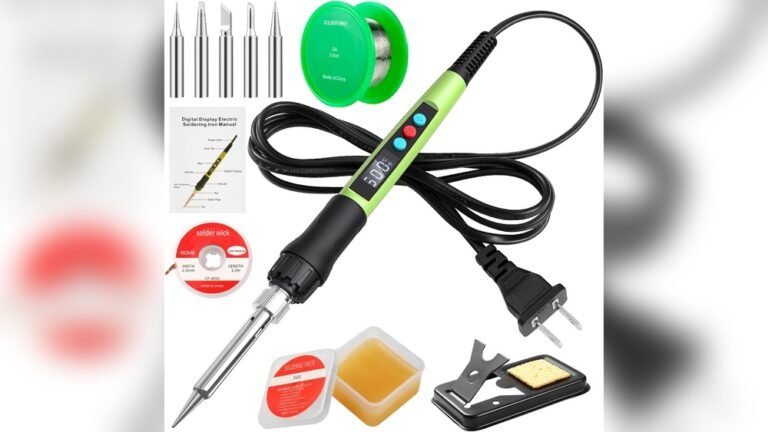
Soldering projects can get frustrating fast if your iron doesn’t heat up quickly or hold a steady temperature. Maybe you’ve tried cheaper irons that struggled with stubborn wires or delicate circuit boards. Getting the right tool makes repairs and DIY work easier, but the choices can feel overwhelming.
There’s a lot to consider with 100 watt soldering iron kits. Some focus on speed and power, others on safety or precision. Price varies, and it’s not always clear what you really need for your tasks. With all the features and extras, it’s easy to get lost or overspend.
This guide breaks down what actually matters so you can pick a kit that fits your projects—without guessing or regret.
What To Think About Before Choosing
First, be clear on how you’ll use your soldering iron. Occasional home repairs need different features than regular electronics work. Think about the type of joints you’ll make, how often you’ll use the kit, and your comfort with digital controls.
Many kits include extra tips, stands, and cleaning tools. Decide if you’ll use these or prefer something simpler. Safety features like child locks or automatic sleep mode might matter more if you work at home or around kids.
Common Buying Mistakes
People often buy the cheapest kit, then get frustrated with slow heating or unreliable temperature control. Others pay extra for features they rarely use. Focus on reliability and what matches your actual projects. A higher wattage iron helps with thick wires, but isn’t always best for fine electronics.
Below, you’ll find a selection of 100 watt soldering iron kits. Each was chosen for different needs, skill levels, and budgets—so you can compare what fits your situation.
Q-ming Digital 100w Soldering Iron Kit
This 100 Watt Soldering Iron Kit stands out for its rapid heating and adjustable temperature, making it ideal for fast, accurate soldering work.

The Q-MING Digital 100W Soldering Iron Kit is designed for those who need a reliable and precise soldering tool for electronics repair, DIY projects, or routine maintenance. With its advanced ceramic heating core, it heats up in just 15 seconds, reducing downtime and letting you get started quickly.
The LED temperature display and easy-to-adjust controls help ensure you always have the right heat for your task.
Using this kit feels straightforward and safe, thanks to the cool-touch handle and clear temperature display. The portable, pen-style design makes it comfortable to hold for longer periods, and the password lock feature adds an extra layer of safety if you have children around.
With this kit, confidence comes from being able to work efficiently and with consistent results every time.
What Stands Out
- Heats up rapidly for minimal waiting
- Precise, adjustable temperature with clear digital display
- Portable and comfortable pen-style design
- Child lock option for added safety
- Effective heat dissipation for cool handling
- Versatile for electronics, crafts, and repairs
Potential Drawbacks To Consider
- High wattage may be excessive for very delicate components
- Password lock setup may require a manual reference
- Kit is basic—advanced users may want more specialized tips
Where This Shines
This kit is best for hobbyists, DIYers, and repair enthusiasts who need a powerful soldering tool that saves time and provides accurate results. It’s especially useful for those working on circuit boards, home appliances, or quick electronic fixes. The password lock feature reduces the worry of accidental burns if kids are nearby, making your workspace safer.
Set your temperature using the LED display and let the iron do the rest—no more guessing or waiting for the right heat. A helpful tip: always use the included stand and sponge to keep the tip clean for smoother joints. If you value reliability and want to avoid surprises mid-project, this kit delivers steady performance and peace of mind. I find the cool handle and clear controls make longer sessions much less tiring.
| Best for | Why |
|---|---|
| DIY electronics repairs | Rapid heat-up and precise control for circuit boards |
| Home appliance maintenance | Reliable for quick fixes and general soldering tasks |
| Hobby crafts and model work | Comfortable pen grip and versatile temperature range |
| Shared or family workspaces | Password lock enhances safety around children |
Kepiog Digital Soldering Iron Kit
The 100 Watt Soldering Iron Kit is a dependable choice for electronics enthusiasts who need fast heating and precise temperature control.

This kit is a complete set for soldering tasks, featuring a 100W digital iron, multiple tips, and essential accessories. It solves the problem of collecting separate tools by including everything needed for common electronics repairs and projects.
Using the KEPIOG Digital Soldering Iron Kit feels straightforward, even for beginners. The fast heat-up and adjustable temperature let you work confidently without long waits or overheating parts. The included magnifying glass and helping hands make it easier to focus on small details and keep components steady.
What Stands Out
- Full accessory kit covers most soldering needs
- Fast heat-up—ready to use in about 20 seconds
- Precise, adjustable digital temperature control
- Magnifying glass with helping hands for small parts
- Comfortable, heat-resistant handle for safety
- Versatile for DIY, electronics, and small repairs
Consider Before Buying
- Might feel oversized for very tiny SMD work
- Includes many tools—may be more than needed for simple tasks
- No advanced features for industrial/professional use
When I’d Pick This
This kit is best for hobbyists, students, or anyone needing a reliable tool for circuit board repair or DIY projects. It removes the hassle of searching for separate accessories and the stress of inconsistent heating, so you can focus on getting clean, solid solder joints.
If you’re new to soldering, start with a lower temperature and work up as needed—this helps prevent accidental damage. The stable helping hands and magnifier really reduce frustration, making tricky jobs much easier. You’ll appreciate the confidence that comes from safer handling and more predictable results.
| Best for | Why |
|---|---|
| Circuit board repairs | Precise digital temperature and steady helping hands |
| DIY electronics projects | Complete kit avoids extra purchases |
| Soldering small parts | Magnifying glass improves accuracy |
| Learning to solder | User-friendly controls and safe handle design |
Q-ming Led Digital Soldering Iron
This 100 Watt Soldering Iron Kit offers precise temperature control and quick heat-up for anyone who needs reliable, efficient soldering.

The Q-MING LED Digital Soldering Iron is a compact kit designed to make soldering faster and easier, whether you’re fixing electronics or starting a DIY project. It addresses the common problem of waiting for slow heat-up times with its advanced 100W ceramic heater that gets ready in just 15 seconds.
With its digital temperature display, you can adjust the heat precisely to match the job, reducing mistakes and frustration.
Using this soldering iron feels stable and controlled, thanks to its clear temperature readout and comfortable, pen-style grip. The cool handle and quick heat dissipation help keep your hands safe, even during longer sessions. You don’t have to worry about overheating parts, and the child lock adds a layer of safety if you’re working at home.
The kit’s thoughtful features mean less guesswork and more consistent results every time.
What Sets This Kit Apart
- Heats up in just 15 seconds for minimal waiting
- Easy-to-read LED temperature display
- Precise temperature control between 180℃ and 500℃
- Switchable Celsius and Fahrenheit units
- Cool handle with improved heat dissipation
- Portable, pen-style design for easy handling
- Built-in child lock for extra safety
Points To Consider Before Buying
- May be more advanced than needed for very simple tasks
- Child lock requires reading the manual to set up
- Not cordless—needs a power outlet
Who This Fits Best
This kit is ideal for people tackling electronics repairs, DIY crafts, or maintaining devices where precise temperature control matters. It removes the stress of overheating or underheating your work, and you don’t have to guess if the tool is ready.
If you often switch between different types of soldering jobs, being able to adjust and monitor temperature on the fly is a major advantage.
For best results, always let the iron reach the set temperature before starting your work, and use the included stand to keep your workspace safe. The child lock feature adds peace of mind, especially if you have kids or pets around.
I like that the clear display and fast heat-up help avoid surprises and wasted time.
| Best for | Why |
|---|---|
| PCB and electronics repair | Precise temperature helps avoid damaging components |
| DIY craft projects | Quick heat-up and portability suit creative tasks |
| Home appliance maintenance | Versatile settings adapt to various repair needs |
| Learning soldering skills | Digital display and safety lock support beginners |
Aucanla Digital 100w Soldering Iron Kit
This 100 Watt Soldering Iron Kit delivers fast, precise temperature control for anyone needing reliable results on electronics or stained glass projects.

The Aucanla Digital 100W Soldering Iron Kit is designed for people who need a high-powered soldering tool that heats quickly and stays accurate. With a temperature range of 356°F–896°F and a digital LCD screen, you can see and adjust the heat in real time, solving the common problem of inconsistent soldering results.
Using this soldering kit feels straightforward and stable, whether you’re at your workbench or on the go. The automatic sleep mode helps you worry less about overheating or wearing out the tip, while the included stand, tips, and cleaning tools make it easy to keep your setup organized and safe.
Why This Kit Stands Out
- Fast and even heating for quick project starts
- Precise digital temperature control with clear display
- Automatic sleep mode extends tip life
- Portable design for work anywhere
- Comes with essential accessories for safety and convenience
- Supports a wide range of soldering tasks, from electronics to stained glass
- 365-day US technical support for peace of mind
Points To Consider
- Not as feature-rich as full soldering stations
- Requires occasional tip changes for different tasks
- High wattage may be overkill for very delicate electronics
What I’d Tell A Friend
If you need a soldering solution that just works—especially for hobby projects, home repairs, or creative work—the Aucanla Digital 100W Soldering Iron Kit is a solid pick. It’s best for anyone who wants to avoid guesswork and get consistent results without a bulky setup.
The digital display and sleep mode remove a lot of the hassle and let you focus on your project.
For new users, keep the included stand close by and always use the protective cap when storing the iron. This small habit keeps your workspace safer and extends the tool’s lifespan. With responsive technical support and thoughtful design, you can feel confident that the kit will deliver reliable performance every time you turn it on.
| Best for | Why |
|---|---|
| DIY electronics repair | Quick heat-up and precise temp control for circuit work |
| Stained glass assembly | High power handles demanding soldering tasks |
| On-the-go repairs | Portable kit with all key accessories included |
| Frequent hobbyist use | Automatic sleep mode and included stand boost safety and convenience |
Common Buyer Concerns
- Temperature Accuracy: Many users worry about whether the displayed temperature matches the tip temperature. Check calibration and reviews before use.
- Safety Features: Password locks and automatic sleep modes are important if you have children or pets. Confirm how these features work in practice.
- Heating Speed: Fast heat-up can save time. However, rapid heating may affect tip lifespan if not used properly.
- Portability: Pen-style and portable kits are convenient. Consider whether you need a dedicated workspace or move tools often.
- Accessory Quality: Stands, tips, wire, and cleaning tools vary in quality. Read reviews or inspect contents if possible.
Decision Checklist
- Do you need adjustable temperature for different tasks?
- Is safety for children or pets a priority in your workspace?
- Will you use the kit for electronics, crafts, or repairs?
- Do you prefer a portable iron or a stationary setup?
- Are you comfortable with basic maintenance (tip cleaning, calibration)?
Who Should Avoid These Kits
- If you need industrial-grade tools for heavy production, these kits may lack durability.
- If you want fully automated soldering stations or built-in fume extraction, consider higher-end models.
- If you only do rare, simple soldering, a basic iron might be enough.
Care And Maintenance Tips
- Clean tips regularly using brass wool or sponge to maintain performance.
- Store the iron with the protective cap to prevent accidents and tip damage.
- Check the heater core for wear if you notice slow heat-up.
- Avoid leaving the iron powered on when not in use.
Frequently Asked Questions
Can I Use These Soldering Kits For Sensitive Electronics?
Yes, but always start at a lower temperature and use appropriate tips. Avoid overheating components.
How Do I Calibrate The Temperature Display?
Most kits include instructions for calibration. Follow the manual for best accuracy.
Are The Included Accessories Reliable?
Accessory quality varies. Tips and stands are generally functional, but some users upgrade for long-term use.
How Does The Password Lock Work?
Password locks prevent children from accidentally powering the iron. Refer to the manual for setup steps.
Is The Automatic Sleep Mode Useful?
Sleep mode helps extend heating core life and reduces risk if you forget to turn off the iron.
Do I Need Special Solder Wire For These Irons?
Standard lead-free solder works well. Use the wire size recommended for your project.
Final Thoughts
Choosing a soldering kit depends on your workspace, safety needs, and frequency of use. Most kits in this category offer reliable temperature control and useful features for beginners and hobbyists. Consider your own comfort with maintenance and accessory quality before deciding.
The right tool should match your tasks and help you work safely and efficiently.